Integrations — Connect Zentor App to Your Tech Stack
Zentor App directly connects Email, Telegram and WhatsApp, and links to further systems via n8n workflows. Here is an honest overview of what is actually possible today.
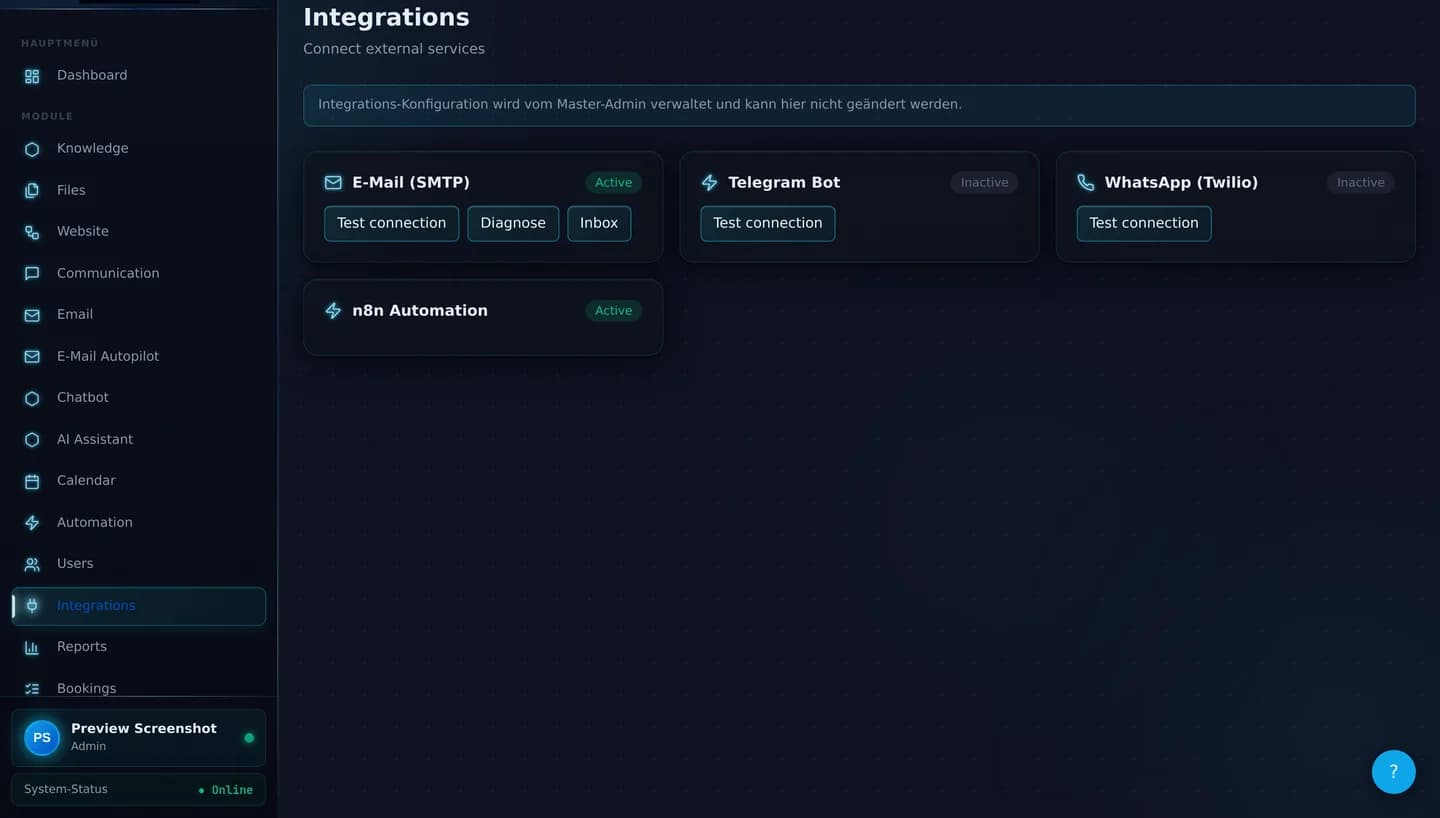
Directly integrated connections
These four connections (communication channels and automation) are built into Zentor App and visible in the dashboard under "Integrations", including connection status and a test function.
Incoming emails appear directly in the Zentor App inbox. Messages can be opened and answered directly, without a separate email program.
Also available: SMTP diagnostics (host, port reachability, DNS records) and a test send.
Telegram as a full communication channel in the omnichannel inbox — messages come together with all other channels in one place.
Connection status and test function directly in the dashboard.
WhatsApp messages also flow into the shared inbox — customers can reach you through the channel they prefer.
Connection status and test function directly in the dashboard.
n8n is connected as a standalone workflow engine. This allows automations to be configured visually, without programming knowledge.
Connection status to n8n is visible in the dashboard under Integrations.
Native system connectors
Zentor App connects to 17 systems via its own connectors — e-commerce, CRM, ERP, calendar, helpdesk, and booking systems. The status is honestly labeled by test progress:
These connectors are fully built in code. What is still missing is the external test connection to a real account or instance — which is why they are transparently listed here as "being connected" rather than advertised as finished. All connectors in this group are optional third-party integrations and not a core function — appointment booking in particular runs on the Zentor-owned calendar and requires no external calendar connector.
View all connectors compared →Telephony / SIP — bookable via the Zentor SIP-Voicebot
In addition to the four channels directly configurable in the dashboard, Zentor App offers telephony via the Zentor SIP-Voicebot (voice pipeline, tariff and billing logic). A phone number and SIP/PSTN connection for incoming and outgoing calls are provided as part of individual setup by Zentor.
Unlike email, Telegram and WhatsApp, this module therefore cannot be activated independently in the tenant dashboard. Please get in touch with us if telephony is relevant for your use case — we will discuss feasibility, provider connection and timeline with you individually.
n8n as a flexible connection layer
n8n is itself a workflow automation platform with a large ecosystem of connectors. Zentor App uses n8n to trigger automations — for example notifications for new inquiries or multi-step processes.
This can in principle also be used to pass data to external systems, provided the target system offers a webhook or an API. This is not a pre-configured one-click integration, but a workflow that is built individually.
Details on automation are explained in our guide article on n8n automation in customer communication.
What Zentor App does not (yet) offer natively beyond the connectors
Beyond the native connectors listed above, there is currently no native connection to other CRM systems such as Salesforce or Pipedrive, other ERP systems besides Odoo, or other shop, calendar, and helpdesk systems. These can generally be connected via individual n8n workflows, provided a webhook or API interface exists.
Missing an integration you specifically need? Talk to us — we will check together whether and how a connection via n8n or a custom solution is possible.
Frequently asked questions about integrations
Which integrations does Zentor App offer directly?
Configurable directly in the dashboard are Email (SMTP, including inbox and reply function directly in Zentor App), Telegram Bot and WhatsApp. In addition, n8n automation is connected as its own integration, which can be used to build workflows to further systems.
Is there a native connection to CRM systems such as HubSpot or Salesforce?
A native HubSpot connector exists (contact and deal sync, notes) — it is implemented, but the connection to a real HubSpot account and full external test verification are still pending. Fully tested native connectors currently exist for WooCommerce, Shopware, PrestaShop, and WordPress. There is no native connection for Salesforce or Pipedrive; such systems can be connected via n8n workflows, provided a webhook or API interface exists.
What exactly does n8n automation do in Zentor App?
n8n is integrated into Zentor App as a standalone automation engine. This allows processes such as notifications, data forwarding or multi-step workflows to be configured visually — without programming knowledge. The connection status to n8n is visible in the dashboard under Integrations.
Can I use the email integration to reply to messages directly?
Yes. After setting up the SMTP credentials, Zentor App shows incoming emails directly in the dashboard inbox. You can open messages and reply directly from Zentor App, without switching to a separate email program.
How can I check whether an integration is working correctly?
For Email, Telegram and WhatsApp, the dashboard provides a test function that actively checks the connection. For Email there is also a diagnostics function that lists SMTP host, port reachability and DNS records.
Who sets up the integrations?
Integration configuration (credentials, activation) is done centrally via the Master Admin as part of setup. In the tenant dashboard you see the connection status and can test connections.
Is telephony / SIP connectivity also possible?
Yes. Phone is bookable via the Zentor SIP-Voicebot; a phone number and suitable SIP/PSTN connection are provided as part of individual setup by Zentor. Unlike email, Telegram and WhatsApp, this module cannot be activated independently in the tenant dashboard — please get in touch with us to set it up.
Your integration not listed?
Talk to us about your specific use case — we will check whether a connection via n8n or a custom solution is possible.
Related pages:
More in the Help Center